When you first install Nulls Brawl, you might be confused. You open the game expecting to see every Brawl unlocked and at Power level 11 with all their gears, gadgets, star powers, hypercharges & buffies unlocked, but instead, you see a fresh Level 1 account with only Shelly unlocked.
It’s actually by design. The developers give you a fresh start so you can experience the progression if you want to. But most players download Null’s Brawl to test maxed-out Brawlers, skins, and hypercharges without spending real money. Because grinding for credits & Starr drops on a private server seems kinda pointless when you can do that on the official server, and to avoid that grinding, they installed the private server.
What are Null’s Brawl Commands?
Null’s Brawl commands are special text codes that you type into the Club Chat or the visual buttons in the shop to trigger server-side actions. Unlike the official game, where typing in chat just sends a message, the Nulls Brawl server listens for specific keywords, like /gems or /clean, to modify your account instantly.
These commands act as shortcuts for developers and players to bypass the game’s normal progression system. Instead of opening thousands of Starr Drops to find legendary skin, you can simply type a command or use the shop interface to unlock everything in seconds.
Nulls Brawl has two types of commands – Shop Commands and Chat Commands.
Shop Commands (Displayed as In-Game Shop Offers)
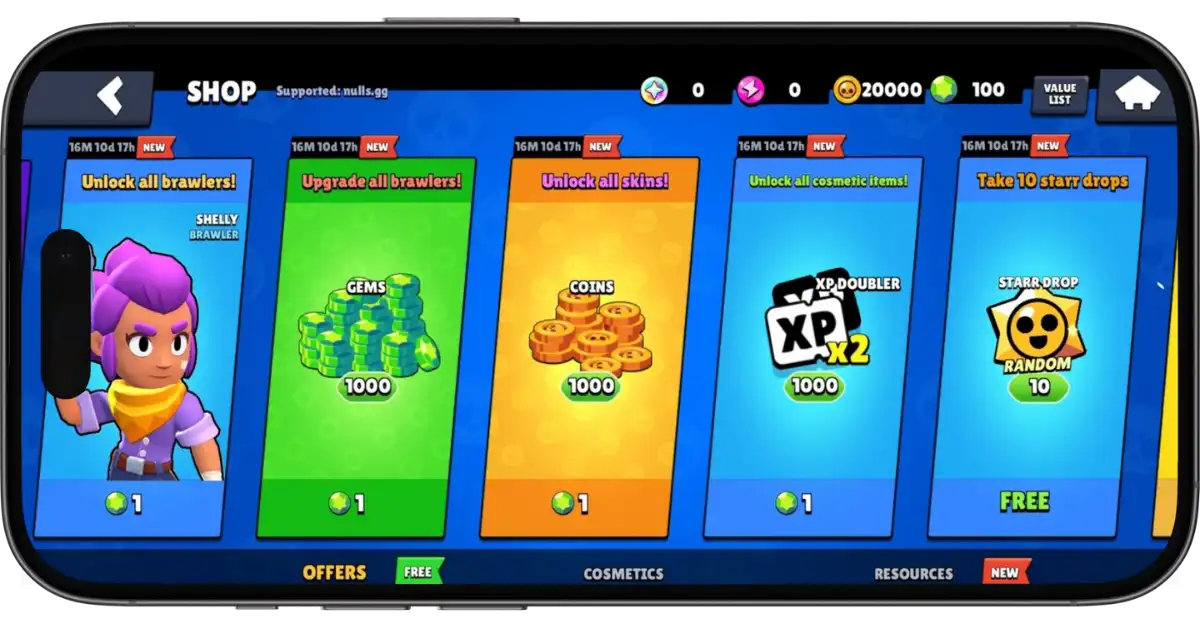
These are the easiest to use. The developers have added the commands as Brawl Box items in the shop. When you buy these items, it triggers the script that instantly unlocks or upgrades everything on your account. It’s the best possible method for most players because it’s fast and impossible to mess up. Even non-tech players can easily use it without needing to type any code.
The Shop Commands have the following commands:
| Commands | What It Does |
|---|---|
| Unlock All Brawlers | It unlocks every character in the game instantly. |
| Upgrade All Brawlers | It maxes out all brawlers’ levels and unlocks their Gadgets, Star Powers, Gears, Hyperchages, and Buffies. |
| Unlock All Skins | It unlocks every available skin for every brawler. |
| Unlock All Costemics | It unlocks all sprays, pins, and player icons. |
| 10 Starr Drops | It opens 10 Starr Drops (for the thirll of opening) |
| Brawl Box | It opens the classical Brawl Box for nostalgia. |
How to Use Shop Commands to Unlock & Upgrade Everything Instantly
- Open Nulls Brawl and go to the Shop.
- Look for the Shelly offer named “Unlock All Brawlers”. It costs 1 gem.
- Tap on it and buy it.
- The game will display the “Login Failed” message. Don’t worry. To unlock all the brawlers and apply these changes, the server restarts your game.
- Tap on the “Try Again” or restart the game. The game will restart, and you will have all brawlers unlocked.
- Go back to the Shop and now buy the next offer named “Upgrade All Brawlers”.
- The game will restart again to apply the changes.
- Now you will have all brawlers at max level, with their gadgets, gears, star powers, hypercharges, and buffies.
- Next, buy the “Unlock All Skins” and “Unlock All Cosmetics” offers in the shop to unlock all skins, pins, and sprays.
- Now you will have everything unlocked and maxed out. No need to grind for hours.
Chat Commands (Text Codes)
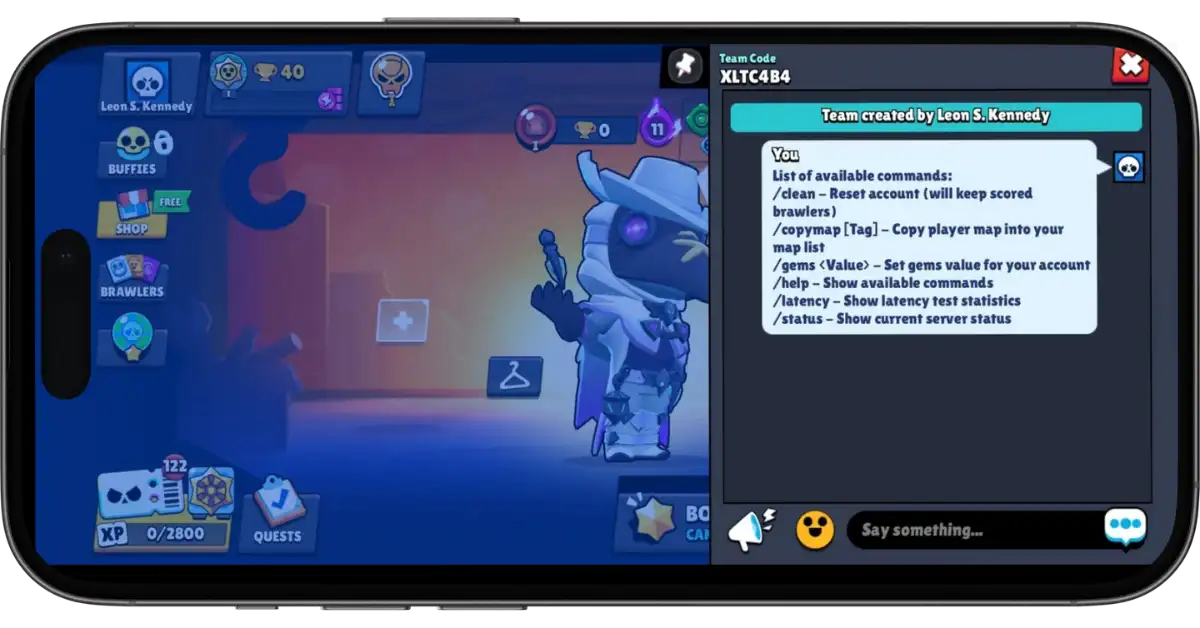
These are the text code commands that you need to type into the Club Chat. These commands always start with a forward slash ( / ). Shop commands are mainly for unlocking & unlocking everything, chat commands are for utility and maintenance, like checking your server lag, resetting the account, saving a map, etc.
The Chat Commands have the following Text Code commands:
| Commands | Function | What It Does |
|---|---|---|
| /help | Command List | It shows all available commands currently enabled in the game. |
| /clear | Reset Account | It resets your account to level 1, but keeps the brawlers you have played with and have trophies. |
| /status | Server Status | It shows the current server status, including online players, uptime, memory usage, battle servers, battles, battles queued, etc. |
| /latency | Check Ping | It shows latency test statistics in milliseconds (ms). |
| /gems value | Set Gems | It sets a specific number of gems in your account. (For instance, /gems 500) |
| /copymap [tag] | Copy Map | It copies a player’s map into your own map list using their tag. |
How to Use Chat Commands
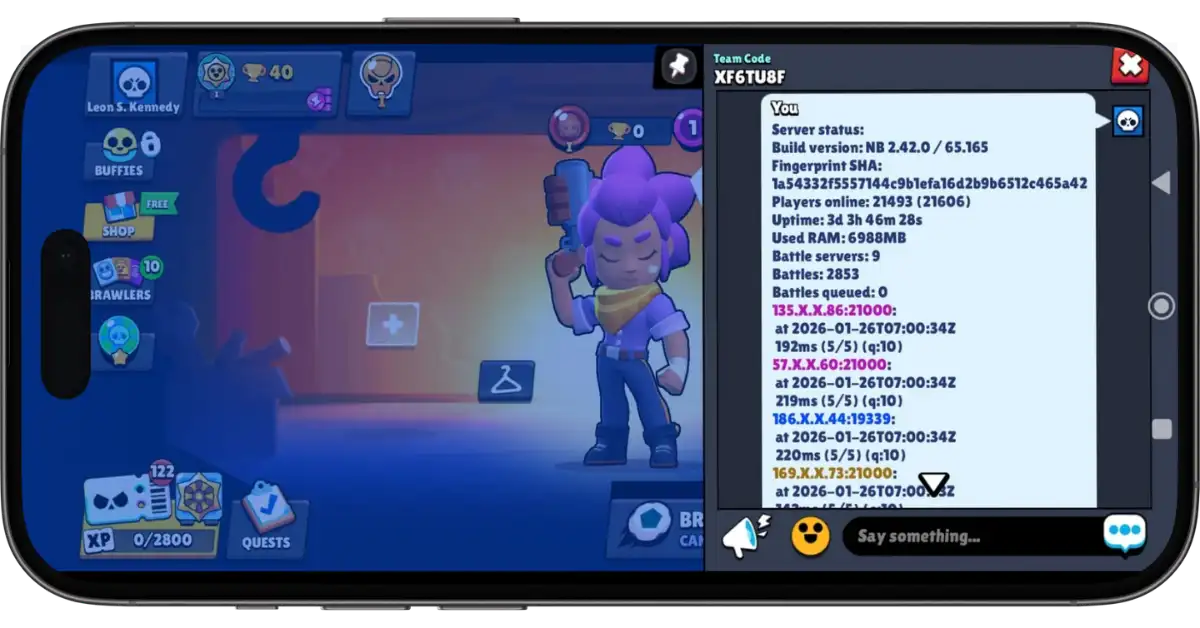
To use the chat commands, you will need to be in a club or a team so that you can type text in the chat. If you’re not in a club or team, then join or create one.
- Join or create a club/team.
- Open the chat.
- Then type the command exactly as shown in the table, including the forward slash ( / ).
- After that, tap Enter.
The “Login Failed” After Using Commands
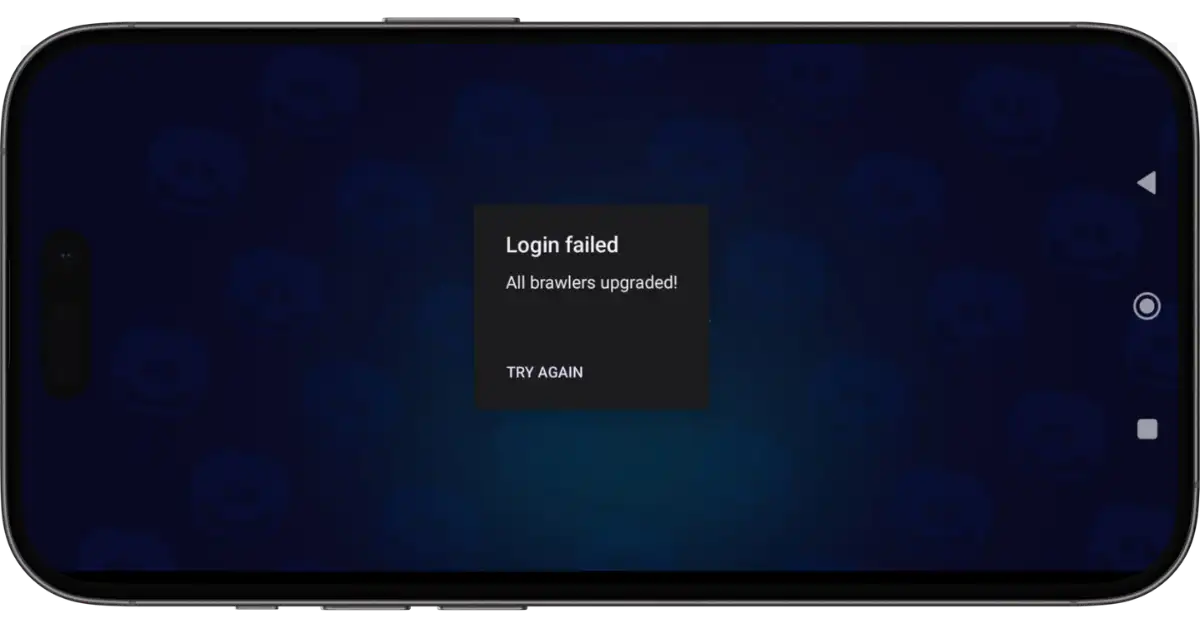
Don’t freak out when you see the “Login Failed” on your screen after buying Shop offers or using the /clear command. It’s not an error. When you instantly unlock all brawlers, skins, or pins, or reset your account, the server and the client (the app) get out of sync. The server needs your game to restart to load all that new data profile. When you see “Login Failed”, it simply means “Reloading Data”. Just tap “Try Again”, and your account will load up with all the new changes applied.
Frequently-Asked Questions
Commands are shortcuts/codes you can use to perform server-side actions instantly. There are Shop Commands (visual buttons in the shop to unlock/upgrade brawlers) and Chat Commands (text codes starting with forward slash / typed in club chat for utility like clearing data or checking ping).
Yes. The visual Shop Commands (shop offers) are designed exactly for this. You can use these commands/offers to unlock & upgrade everything instantly without typing any codes.
No. Nulls Brawl is a private server, separate from the official Brawl Stars servers. The developers of Nulls Brawl intentionally provide these commands for players to instantly unlock everything & max out all brawlers.
Make sure you are typing the commands with the forward slash ( / ) and that the commands are active in the current version. Type /help in the chat to see the list of active commands in the game.
Cna you add free chaos drops in the shop
I am not the developer brother 🙂
is there a way to get credits instantly or just fast? doesnt have to be with commands
I don’t think it’s possible!
Credits are used to unlock the brawlers. But you can unlock all brawlers by using the “Unlock All Brawlers” button in the shop. So, there’s no need for credits, right? Whenever new brawler is added in any update, you need to unlock it, you can go to the Shop and buy that “Unlock All Brawlers” button, if you are asking for credits for this purpose.
Is there a way to reset the ranked Battle card?
Sorry, pal. I don’t get it. What do you mean by ‘reset’?